How to Connect Oracle SQL Developer to PostgreSQL Using JDBC
Introduction
Oracle SQL Developer is primarily an Oracle Database development tool, but it can also connect to several third-party database platforms, including PostgreSQL.
For Oracle DBAs, developers, architects, and technical teams beginning to work with PostgreSQL—or evaluating an Oracle-to-PostgreSQL migration—SQL Developer provides a familiar interface for accessing PostgreSQL databases, browsing database objects, and executing SQL.
This guide uses an actual connection configured with Oracle SQL Developer 24.3.1, the PostgreSQL JDBC 42.7.10 driver, and Amazon Aurora PostgreSQL.
Tested Environment
- Oracle SQL Developer: 24.3.1
- PostgreSQL JDBC Driver: 42.7.10
- Database Platform: Amazon Aurora PostgreSQL
- PostgreSQL Port: 5432
- Client Platform: Windows
The screenshots in this guide are taken from an actual PostgreSQL connection configured and tested by eSolution.
Update: Although this was created and written using SQL Developer 24.3.1, we have also tested this with SQL Developer 26.x.
Can Oracle SQL Developer Connect to PostgreSQL?
Yes. Oracle SQL Developer supports connections to PostgreSQL through a third-party JDBC driver.
SQL Developer itself does not include everything required to establish the PostgreSQL connection out of the box. You must first download the appropriate PostgreSQL JDBC driver (pgJDBC) and register the JAR file with SQL Developer.
After the driver is added, PostgreSQL becomes available as a database type when creating a new SQL Developer connection.
This same approach can be used for:
- Standard PostgreSQL installations
- Amazon RDS for PostgreSQL
- Amazon Aurora PostgreSQL
- PostgreSQL running on cloud virtual machines
- PostgreSQL running on-premises
Why PostgreSQL Is Not Listed Initially in Oracle SQL Developer
One of the first things you may notice when attempting to create a PostgreSQL connection is that PostgreSQL may not initially be available as a database type.
This is expected.
SQL Developer requires the PostgreSQL JDBC driver before it can enable the PostgreSQL connection option.
The process is therefore:
Download JDBC Driver → Add Driver to SQL Developer → Create PostgreSQL Connection
Once the PostgreSQL JDBC driver has been registered, PostgreSQL should become available in the Database Type list.
What You Need to Connect SQL Developer to PostgreSQL
Before starting, make sure you have:
- Oracle SQL Developer installed
- Access to the target PostgreSQL database
- PostgreSQL hostname, DNS name, or AWS endpoint
- PostgreSQL TCP port
- PostgreSQL database name
- PostgreSQL username
- PostgreSQL password
- PostgreSQL JDBC driver (.jar)
- Network connectivity from your workstation to the PostgreSQL server
The default PostgreSQL TCP port is: 5432
Your environment may use a different port.
Step 1 – Download the PostgreSQL JDBC Driver
SQL Developer needs a PostgreSQL JDBC driver to communicate with PostgreSQL.
Download the driver from the official PostgreSQL JDBC (pgJDBC) project. (https://jdbc.postgresql.org/download/)
The downloaded file will normally have a name similar to: postgresql-42.7.x.jar
The environment used for this article uses: postgresql-42.7.10.jar
Use a JDBC driver version appropriate for your SQL Developer Java environment rather than assuming the version shown here will always be the latest release.
Store the JAR file in a permanent location instead of leaving it in a Downloads or temporary directory.
For example: C:\OraTools\sqldeveloper-24-3-1\jdbc\postgres\
Keeping third-party JDBC drivers in a controlled location makes future upgrades and troubleshooting easier.
Step 2 – Add the PostgreSQL JDBC Driver to Oracle SQL Developer
Start Oracle SQL Developer.
From the top menu select: Tools → Preferences
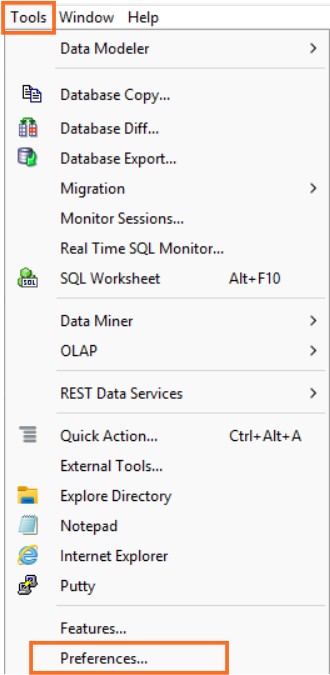
The Preferences window contains the configuration area used to register third-party JDBC drivers.
Step 3 – Add the PostgreSQL JDBC Driver to Oracle SQL Developer
From the Preferences window navigate to: Database → Third Party JDBC Drivers
Click: Add Entry
Browse to the location where you saved the PostgreSQL JDBC JAR.
In our environment, the configured driver is:
C:\OraTools\sqldeveloper-24-3-1\jdbc\postgres\postgresql-42.7.10.jar
Select the JAR file and confirm that it appears in the: Third-party JDBC Driver Path
Click OK to save the configuration.
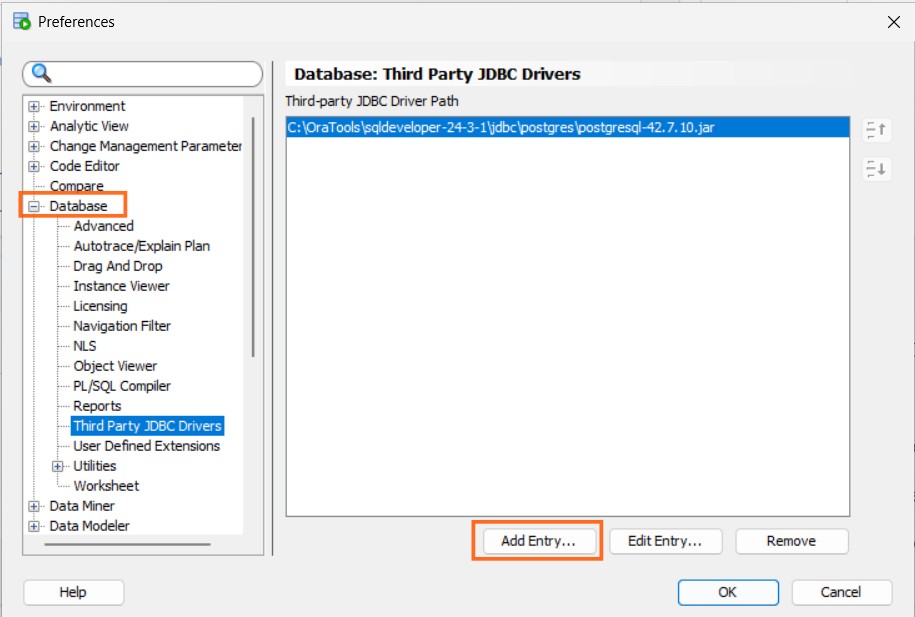
This is the key configuration step. SQL Developer now has access to the PostgreSQL JDBC driver required to establish PostgreSQL connections.
If PostgreSQL still does not appear when creating a connection, close and restart SQL Developer after confirming that the correct JAR file is configured.
Step 4 – Configure a New PostgreSQL Connection
Return to the Connections panel.
Click the New Connection icon (the green + icon).
Select: New Database Connection
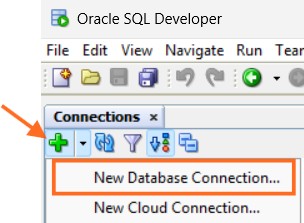
The New / Select Database Connection window will open.
Because the PostgreSQL JDBC driver has now been installed, PostgreSQL should be available under Database Type.
Step 5 – Select PostgreSQL as the Database Type
You should have a serious naming convention for naming all your database connections.
Enter a meaningful connection name that identifies the database and environment.
For example: AWS-Aurora-PostgreSQL-DEV
or: PostgreSQL-Production
For Database Type select: PostgreSQL

SQL Developer will now display the connection fields appropriate for PostgreSQL.
Step 6 – Configure the PostgreSQL Connection
Enter the PostgreSQL connection information supplied by your database administrator or cloud platform.
PostgreSQL Host Name
Enter the DNS hostname or IP address of the PostgreSQL database server.
For a PostgreSQL database running on AWS, this will typically be an Amazon RDS or Amazon Aurora database endpoint.
For example: mydatabase.cluster-xxxxxxxx.us-east-1.rds.amazonaws.com
Use your actual database endpoint rather than this example. For this test, we used AWS, but this is essentially the database server name.
PostgreSQL Port
Enter the TCP port used by PostgreSQL.
The standard PostgreSQL port is: 5432
If your environment uses a non-standard port, enter the configured value instead.
PostgreSQL Database Name
Select or enter the PostgreSQL database that you want to access.
SQL Developer provides a Choose Database option for PostgreSQL connections.
For example: postgres
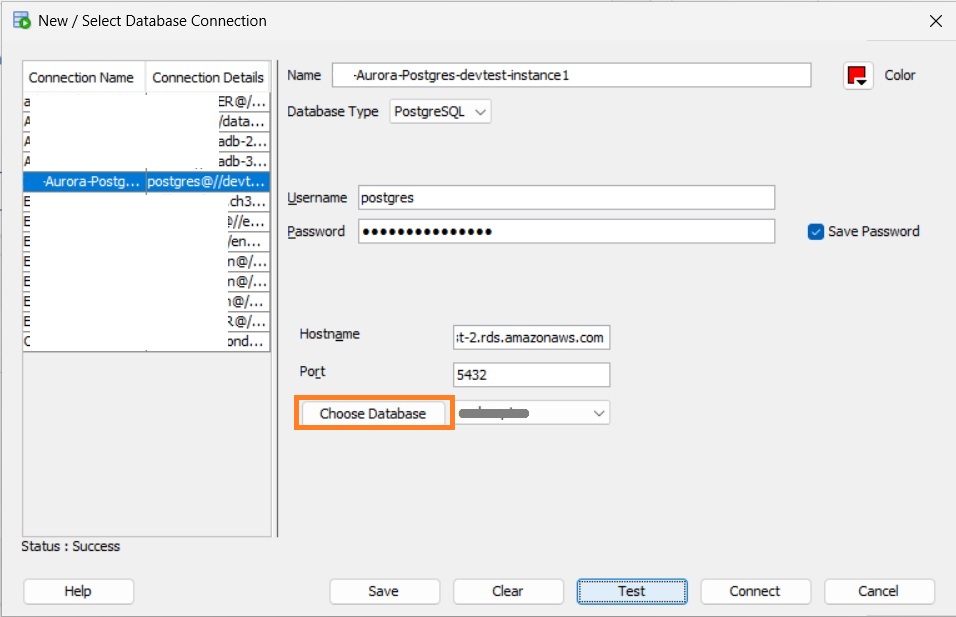
PostgreSQL Username and Password
Enter the PostgreSQL database username and password.
For production environments, avoid routinely connecting with the PostgreSQL administrative ‘postgres‘ account.
A better practice is to create a dedicated database account with only the privileges required for the user’s role.
Examples could include:
- application_admin
- reporting_user
- dev_user1
The actual account and privileges should follow your organization’s security standards.
Step 7 – Test the PostgreSQL Connection
Once the connection information has been entered, click:
Test
SQL Developer will attempt to connect to PostgreSQL using the JDBC driver and the information provided.
If the connection is successful, you should see:
Status: Success
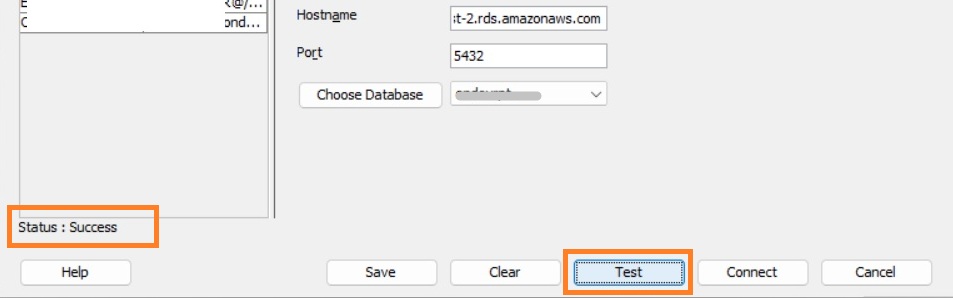
Click: Connect
The PostgreSQL database will now appear in the SQL Developer Connections navigator.
Step 8 – Browse PostgreSQL Objects and Run SQL
Once connected, SQL Developer can provide a familiar interface for Oracle professionals working with PostgreSQL.
Depending on the privileges assigned to the PostgreSQL account, you can browse database objects such as:
- Tables
- Views
- Indexes
- Procedures
- Functions
- Sequences
- Triggers
You can also open a SQL Worksheet and execute PostgreSQL SQL statements directly against the database.
For Oracle DBAs beginning to work with PostgreSQL, this can be particularly useful because it allows both Oracle and PostgreSQL database connections to be accessed from a familiar development environment.
Connecting Oracle SQL Developer to Amazon RDS or Aurora PostgreSQL
The JDBC configuration is only one part of connecting to a PostgreSQL database hosted on AWS.
The workstation running SQL Developer must also have network connectivity to the AWS database endpoint.
AWS PostgreSQL Endpoint and Port
For Amazon RDS or Amazon Aurora PostgreSQL, use the appropriate AWS database endpoint as the SQL Developer hostname.
Depending on the architecture, this could be an:
- RDS PostgreSQL instance endpoint
- Aurora PostgreSQL cluster/writer endpoint
- Aurora PostgreSQL reader endpoint
Select the endpoint appropriate for the intended workload.
For database administration and write operations, ensure that you are connecting to an endpoint capable of accepting writes.
AWS Security Groups and Network Connectivity
Check the complete network path between the workstation and PostgreSQL.
This can include:
- AWS Security Groups
- VPC routing
- Network ACLs
- Corporate firewall rules
- Site-to-Site VPN
- AWS Client VPN
- Direct Connect
- DNS resolution
- Local firewall rules
The PostgreSQL port must be reachable from the system running SQL Developer.
For example: TCP 5432
Do not solve connectivity problems by simply exposing PostgreSQL port 5432 broadly to the Internet.
Access should be restricted to trusted networks, approved VPN ranges, application servers, bastion hosts, or specifically authorized administrative IP addresses.
SSL/TLS Considerations
Production PostgreSQL environments should use appropriate encryption controls when database traffic crosses networks that are not fully trusted.
Review the PostgreSQL server’s SSL/TLS configuration and your organization’s security requirements.
Cloud-managed PostgreSQL services may also have specific certificate and encryption requirements that should be considered when designing production connectivity.
PostgreSQL Connection Security Best Practices
Database connectivity should follow the same security principles regardless of whether the target database is Oracle or PostgreSQL.
For production environments:
- Avoid routine use of highly privileged administrative accounts
- Apply least-privilege database permissions
- Restrict PostgreSQL network access
- Use encrypted connections where appropriate
- Protect database credentials
- Separate application, reporting, development, and administrative accounts
- Audit privileged access
- Avoid unnecessarily storing privileged passwords on shared workstations
The Save Password option visible in SQL Developer can be convenient, but whether it should be used depends on the sensitivity of the account and your organization’s credential-management policies.
Using SQL Developer for Oracle and PostgreSQL Environments
Connecting SQL Developer to PostgreSQL can be particularly useful for organizations operating heterogeneous database environments.
Oracle DBAs and developers can use it to:
- Inspect PostgreSQL schemas and database objects
- Query PostgreSQL data
- Compare Oracle and PostgreSQL structures
- Validate migrated data
- Assist with database migration assessments
- Support hybrid Oracle/PostgreSQL environments
- Work with Amazon RDS PostgreSQL
- Work with Amazon Aurora PostgreSQL
- Familiarize Oracle technical teams with PostgreSQL
It can therefore be a useful tool during the early stages of Oracle-to-PostgreSQL migration projects for many.
Oracle SQL Developer and Oracle-to-PostgreSQL Migration
It is important to distinguish connecting SQL Developer to PostgreSQL from performing a complete Oracle-to-PostgreSQL migration.
SQL Developer can be useful for accessing, inspecting, querying, comparing, and validating heterogeneous database environments, but it should not be considered a complete turnkey Oracle-to-PostgreSQL migration solution, as it can be when migrating an on-prem Oracle database to OCI.
Complex migrations can involve considerably more than moving tables and data.
Areas that may need to be assessed include:
- Oracle and PostgreSQL datatype differences
- Schema conversion
- Sequences and identity columns
- Constraints and indexes
- PL/SQL conversion
- PL/pgSQL development
- Oracle-specific SQL
- Packages and stored procedures
- Application dependencies
- Database links and integrations
- Security and authentication
- Transaction behaviour
- Performance optimization
- Backup and recovery
- High availability
- Disaster recovery
- Data validation
- Application testing
- Cutover and rollback planning
The migration strategy should therefore be based on the complete application and database architecture rather than simply converting individual database objects.
Oracle-to-PostgreSQL Migration and Database Modernization Services
Connecting SQL Developer to PostgreSQL is straightforward.
Migrating a complex enterprise Oracle environment to PostgreSQL can be a very different undertaking.
A successful migration requires understanding not only the database, but also the applications, integrations, availability requirements, security controls, operational processes, performance characteristics, and business dependencies surrounding it.
For complex Oracle-to-PostgreSQL migrations, turnkey database migration and integration projects, or database-agnostic solutions designed to reduce dependency on a single database platform and licensing cost, eSolution can help.
Turnkey Oracle-to-PostgreSQL Migration and Integration
Our specialists can assist organizations with:
- Oracle-to-PostgreSQL migration assessments
- Database architecture and migration planning
- Schema and data migration
- PL/SQL remediation and conversion
- PostgreSQL and Amazon Aurora PostgreSQL implementation
- AWS database migration
- Oracle and PostgreSQL integration
- Migration testing and validation
- Performance optimization
- Production cutover planning
- Cloud and hybrid database architecture
Database-Agnostic Solutions to Reduce Oracle Dependency
For some organizations, the best strategy is not simply replacing one database with another.
Application modernization can provide an opportunity to reduce database-platform dependencies and make future technology choices more flexible.
eSolution can help assess architectures that:
- Reduce Oracle-specific dependencies
- Separate application logic from database-specific functionality
- Support PostgreSQL and other database platforms
- Modernize legacy Oracle applications
- Move suitable workloads to open-source databases
- Reduce the organization’s Oracle technology footprint
- Identify opportunities to reduce Oracle licensing and infrastructure costs
The appropriate architecture depends on application complexity, performance, security, availability, support requirements, and the business value of the migration.
For complex migrations, turnkey migration or integration projects, or database-agnostic solutions aimed at reducing your Oracle footprint and licensing costs, get in touch with one of our database specialists at eSolution.
Frequently Asked Questions
Can Oracle SQL Developer connect to PostgreSQL?
Yes.
Oracle SQL Developer can connect to PostgreSQL by using the PostgreSQL JDBC driver. The driver must first be added under Tools → Preferences → Database → Third Party JDBC Drivers.
Why is PostgreSQL not listed in Oracle SQL Developer?
PostgreSQL may not initially appear as an available database type because SQL Developer requires the PostgreSQL JDBC driver.
After downloading and registering the PostgreSQL JDBC JAR, PostgreSQL should become available when creating a new database connection.
Which JDBC driver does SQL Developer need for PostgreSQL?
SQL Developer uses the PostgreSQL JDBC driver, commonly known as pgJDBC.
The driver is distributed as a JAR file with a filename similar to: postgresql-42.7.x.jar
Use a driver version compatible with the Java environment used by your version of SQL Developer.
What port does PostgreSQL use?
The standard PostgreSQL TCP port is: 5432
A PostgreSQL installation can be configured to use a different port.
Can Oracle SQL Developer connect to Amazon RDS PostgreSQL?
Yes.
SQL Developer can connect to Amazon RDS for PostgreSQL as long as:
- The PostgreSQL JDBC driver is configured
- The correct AWS endpoint is used
- The PostgreSQL database credentials are valid
- Network connectivity is available
- AWS Security Groups and other network controls permit the connection
Can Oracle SQL Developer connect to Amazon Aurora PostgreSQL?
Yes.
Amazon Aurora PostgreSQL is compatible with the PostgreSQL JDBC driver. Use the appropriate Aurora PostgreSQL endpoint, port, database name, and credentials when creating the SQL Developer connection.
The screenshots in this article demonstrate an actual connection to an Amazon Aurora PostgreSQL environment.
Can SQL Developer be used for Oracle-to-PostgreSQL migration?
SQL Developer can be useful when working with both Oracle and PostgreSQL databases, particularly for database inspection, querying, migration assessment, and validation.
However, connecting SQL Developer to PostgreSQL should not be confused with a complete Oracle-to-PostgreSQL migration solution.
Complex migrations require assessment of schemas, data, PL/SQL, application dependencies, integrations, security, performance, testing, and production cutover requirements.
Summary
Oracle SQL Developer can provide Oracle DBAs and developers with a familiar interface for connecting to PostgreSQL.
The most important point for a first-time connection is that PostgreSQL will not necessarily be available as a database type until the PostgreSQL JDBC driver has been installed.
The basic process is:
- Download the PostgreSQL JDBC driver
- Open Tools → Preferences → Database → Third Party JDBC Drivers
- Add the PostgreSQL JDBC JAR
- Create a new database connection
- Select PostgreSQL as the Database Type
- Enter the hostname, port, database, username, and password
- Test and connect
Once configured, SQL Developer can be a useful tool for Oracle professionals beginning to work with PostgreSQL, Amazon RDS for PostgreSQL, Amazon Aurora PostgreSQL, and heterogeneous Oracle/PostgreSQL environments.
For organizations considering a larger migration, the database connection is only the beginning. A well-designed Oracle-to-PostgreSQL strategy should consider the complete application architecture, operational requirements, and opportunities to reduce database-platform dependencies.
Need help with a complex Oracle-to-PostgreSQL migration, integration, or database modernization project? Contact an eSolution database specialist to discuss your environment and options for reducing Oracle dependency and licensing costs.